
If you are searching for the best animation software for explainer videos, marketing content, YouTube videos, or educational projects, Vidtoon vs Toonly is a comparison worth making. Both platforms are designed to help non-designers create animated videos without learning professional animation software, but they take somewhat different approaches.
Vidtoon emphasizes 2D animation, customizable scenes, characters, transitions, camera effects, text animation, and built-in media resources. Toonly, meanwhile, is built around quick cartoon-style explainer videos, with a large library of characters, props, backgrounds, premade scenes, audio, and straightforward editing tools.
So, which one should you choose?
The answer depends less on which software is universally "better" and more on the kind of videos you need to produce. This guide compares Vidtoon and Toonly across features, ease of use, pricing, customization, audio, exports, and practical use cases so you can make the decision with fewer surprises.
Vidtoon vs Toonly: Quick Comparison
Before getting into the details, here is the short version:
| Category | Vidtoon | Toonly |
|---|---|---|
| Main strength | Flexible 2D animated videos | Fast cartoon explainer videos |
| Ease of use | Beginner-friendly | Very beginner-friendly |
| Animation workflow | Drag-and-drop with more scene controls | Drag-and-drop and premade scenes |
| Characters | Ready-made animated characters | Large library of character images and poses |
| Backgrounds & props | Backgrounds, images, GIFs, icons and other resources | Characters, props, backgrounds and scenes |
| Voiceover | Audio import and text-to-speech options | Voice recording, audio upload and stock music |
| Camera effects | Zoom in/out | Primarily explainer-focused workflow |
| Export | FHD and social-media-oriented output options | Up to 1080p, with frame-rate and quality controls |
| Best for | Marketers and creators wanting more visual flexibility | Businesses wanting fast, simple explainers |
| Pricing | Current offer should be checked before purchase | Subscription/annual membership |
The biggest takeaway is simple: Vidtoon gives you more flexibility in the animation workflow, while Toonly is particularly strong when speed and simplicity matter most.
What Is Vidtoon?
Vidtoon is a 2D drag-and-drop animation tool aimed at people who want to create animated explainer and marketing videos without relying on professional animators. Also check AI Tools vs Human Intelligence: Who Do People Trust More?
The current Vidtoon 2.1 product page highlights ready-made characters, HD backgrounds, royalty-free music, text animation, transitions, camera zoom, imported media, GIFs, icons, and Microsoft and Google text-to-speech options. It also says videos can be created for different social-media resolutions and that projects can be significantly longer than earlier versions.
Vidtoon's Main Features
Some of the more useful Vidtoon capabilities include:
- Drag-and-drop scene creation
- Ready-made animated characters
- HD backgrounds
- Royalty-free music
- Text animation
- Camera zoom in and zoom out
- Transitions
- Imported images and audio
- Built-in images, GIFs and icons
- Text-to-speech using Microsoft and Google voice options
- Full HD export
- Support for longer animated videos
Vidtoon also has a dedicated help center covering projects, templates, themed characters, the marketplace, multi-scene projects, previewing, and other editing functions.
Who Is Vidtoon Best For?
Vidtoon makes the most sense if you want to create:
- Marketing explainer videos
- Animated educational content
- YouTube videos
- Product demonstrations
- Social-media videos
- Story-driven 2D animations
- Videos that require more control over scenes and visual movement
It is particularly attractive if you do not want your animation to feel like a basic slideshow of static cartoon characters.
What Is Toonly?
Toonly is an animated explainer-video creator from the company behind Doodly. Its central idea is straightforward: choose a background, add characters and props, arrange them on the timeline, add audio, and export the finished video.
Toonly's official website positions the software as an easy-to-use tool for people without technical, design, or video-production skills. It also provides premade scenes that combine backgrounds, characters, and props to speed up production.
Toonly's Main Features
Depending on the current plan, Toonly provides access to features such as:
- Character images and animations
- Large prop libraries
- Backgrounds and scenes
- Premade scenes
- Scene transitions
- Background music
- Text animations
- Voiceover recording
- Audio uploads
- Multiple-computer installation
- HD video export
- Custom font support
The current Toonly pricing page lists different asset quantities between its Standard and Enterprise plans, including characters, animations, props, backgrounds, premade scenes, transitions, audio tracks, and text animations.
Who Is Toonly Best For?
Toonly is especially suitable for:
- Business explainer videos
- Sales and landing-page videos
- Product explanations
- Training content
- Social-media marketing
- Simple educational videos
- Short promotional animations
If your priority is creating a professional-looking explainer quickly rather than building highly elaborate animation sequences, Toonly's straightforward workflow can be a major advantage.
Animation Quality and Visual Style
This is where the two products start to feel different.
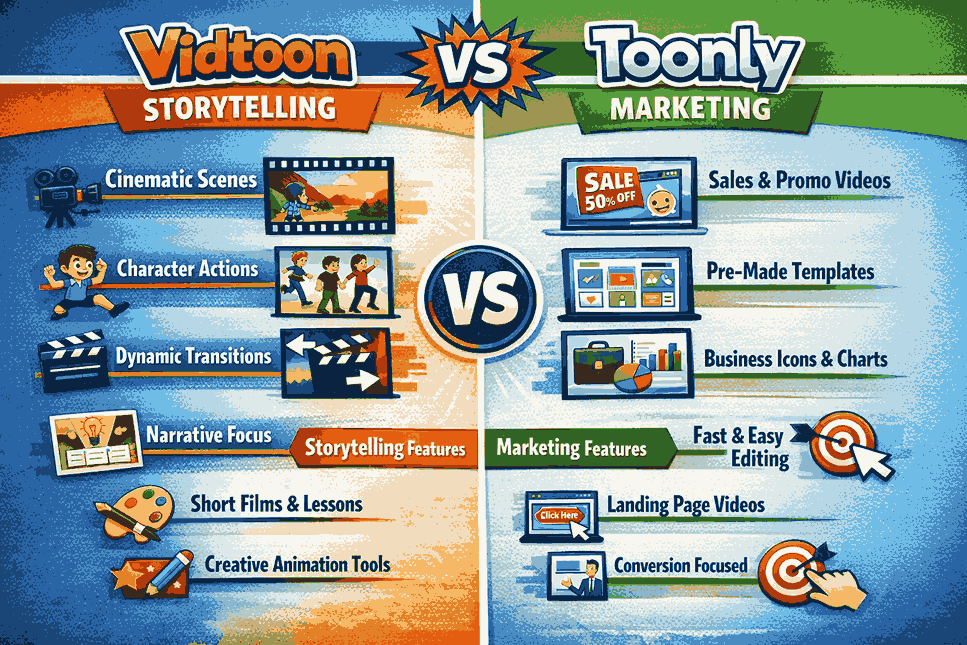
Vidtoon is designed around 2D animation with scene movement, transitions, camera effects, animated text, characters, and imported media. Its feature set gives creators several ways to make a scene feel more dynamic.
Toonly takes a more focused approach. Its strength is not necessarily giving you an enormous animation-production toolkit. Instead, it gives you professionally illustrated assets that can be assembled quickly into clear explainer videos. The company says its character, background, and prop assets are custom-drawn rather than simply being generic stock photographs.
Which Looks Better?
There is no objective winner here.
Choose Vidtoon if you want more freedom to experiment with movement, transitions, zooms, text, and different media.
Choose Toonly if you prefer a consistent cartoon-explainer aesthetic and want to concentrate on communicating an idea rather than manipulating every visual detail.
For a sales video explaining a complicated service, Toonly's simplicity can actually be an advantage. For a more creative animated sequence, Vidtoon's additional controls may be more useful.
Ease of Use: Vidtoon vs Toonly
Both products are designed for beginners, but ease of use can mean different things.
Vidtoon uses a drag-and-drop workflow and provides ready-made resources, making it possible to build scenes without professional animation skills. Its additional controls can, however, mean that users have more options to learn.
Toonly deliberately keeps the process simple. Its official website describes a workflow based on selecting backgrounds, dragging characters onto the scene, animating them, and combining premade scenes when speed is important.
Best Choice for Absolute Beginners
Toonly gets the edge for simplicity.
If you have never created an animated video and simply want to produce a business explainer as quickly as possible, its focused interface is appealing.
Vidtoon is still accessible to beginners, but users who want to take advantage of its broader animation capabilities may need a little more experimentation.
Character and Asset Libraries
A good animation program is only as useful as the assets available inside it.
Vidtoon currently advertises more than 25 characters with multiple animations, HD cartoon backgrounds, royalty-free music, and additional resources. It also provides access to images, GIFs, icons and other media.
Toonly has a substantial library of characters, props and backgrounds. Its current pricing page also shows that the size of the included library varies by membership tier.
Which Has Better Assets?
For business explainers, Toonly's focused collection is highly practical.
For more varied animated content, Vidtoon's combination of characters, backgrounds, imported media, GIFs and icons gives you additional creative possibilities.
The better option ultimately depends on whether you value a curated library or broader flexibility.
Voiceovers, Music and Audio
Audio can make an average animated video feel dramatically better.
Vidtoon supports imported audio and offers text-to-speech capabilities using Microsoft and Google voice options. Its product information also highlights royalty-free music.
Toonly supports voiceover recording, audio uploads and background music. Its current product information says users can record a voiceover directly inside the application or upload professionally recorded audio.
Which Is Better for Voiceovers?
If you want built-in text-to-speech options, Vidtoon has a notable advantage.
If you prefer recording your own narration or uploading a professionally produced voice track, both platforms can handle that workflow.
For serious commercial work, however, the quality of the script and voice usually matters more than which animation application you choose.
Export Quality and Compatibility
Your finished video is only useful if you can export it in a format suitable for your audience.
Vidtoon advertises Full HD export and multiple resolution options for social platforms.
Toonly's official information says it can export high-quality MP4 videos and provides resolution, frame-rate, and quality controls, including output up to 1080p.
Both are therefore capable of producing videos suitable for websites, YouTube and social media.
The more important question is whether your chosen platform, campaign, or client requires a specific resolution, aspect ratio, frame rate, or file format. Always check the current export options before purchasing if you have strict production requirements.
Vidtoon vs Toonly Pricing
Pricing is one area where older comparison articles can become misleading quickly.
Vidtoon's current website advertises Vidtoon 2.1 at $49/month at the time of checking, while its product information also points users toward a separate lifetime sales page. This means you should verify the actual checkout offer and licensing terms before making a purchase.
Toonly's current official pricing page lists $49/month for Standard and $79/month for Enterprise, with annual options of $490 and $790 respectively. The plans include different quantities of characters, animations, props, backgrounds, scenes, transitions and audio assets.
Toonly also currently advertises a 14-day free trial on its Voomly Cloud offering.
Which Is Better Value?
Do not judge value solely by the headline price.
Instead, consider:
- How often you will create videos
- How many assets you need
- Whether you need text-to-speech
- Whether you require commercial rights
- How long your videos will be
- Whether you need regular updates
- Whether you need additional video tools
- Whether the current plan is monthly, annual, or a promotional offer
Always check the current official pricing page before buying, because promotional prices, plan structures and included assets can change.
Vidtoon vs Toonly: Pros and Cons
Vidtoon Pros
- Flexible 2D animation workflow
- Camera zoom controls
- Animated text
- Built-in images, GIFs and icons
- Text-to-speech options
- HD export
- Import your own media
- Useful for marketing and creative projects
- Supports longer animated videos
Vidtoon Cons
- More features can mean a slightly steeper learning curve
- Some current marketing claims are promotional and should not be treated as independent performance evidence
- Pricing and licensing offers should be verified at checkout
Toonly Pros
- Very beginner-friendly
- Fast drag-and-drop workflow
- Strong explainer-video focus
- Large collection of characters and props
- Premade scenes speed up production
- Voice recording and audio uploads
- Multiple export settings
- Available for Mac and PC
Toonly Cons
- Less focused on highly elaborate animation workflows
- The cartoon style may not suit every brand
- Asset quantities depend on the plan
- Ongoing membership costs should be considered for long-term use
Which One Should You Choose?
The best choice becomes much clearer when you start with the type of video you want to make.
Choose Vidtoon If You Want More Creative Flexibility
Vidtoon is the better fit if you want to combine animated characters with custom media, text animation, transitions, camera movement, backgrounds, GIFs and other visual elements.
It is also worth considering if built-in text-to-speech is important to your workflow.
Choose Toonly If You Want Speed and Simplicity
Toonly is the stronger choice when your main goal is producing clear cartoon explainers quickly.
Its premade scenes, characters, props and straightforward editing workflow reduce the amount of time spent building a scene from scratch.
For marketers, small businesses, trainers and entrepreneurs who need to explain products or services without becoming animation experts, this simplicity can be more valuable than having dozens of advanced controls.
Vidtoon vs Toonly for YouTube
Both tools can be used to produce YouTube content, but your format matters.
For short educational explainers, product demonstrations and marketing-focused videos, either can work well.
For longer storytelling videos, Vidtoon's broader animation and scene controls may be more useful. Vidtoon specifically advertises support for videos up to 25 minutes, although actual production requirements and workflow should be tested for your project.
If your YouTube strategy depends on rapidly producing simple animated explainers, Toonly's streamlined workflow may save more time.
Vidtoon vs Toonly for Business
For business users, the decision should start with the purpose of the video.
A sales video needs clarity. An internal training video needs consistency. A social advertisement needs speed. A brand story may need more visual flexibility.
Toonly is particularly strong for straightforward business explainers, thanks to its focused asset library and premade scenes.
Vidtoon is more attractive when the marketing team wants additional creative control over scenes, text, transitions, camera movement and imported media.
Neither tool automatically creates a high-converting video. The script, offer, storytelling, voiceover and editing decisions will still determine much of the final result.
FAQ
Is Vidtoon better than Toonly?
Neither is universally better. Vidtoon is a strong option for users who want greater animation flexibility and features such as camera movement, animated text and text-to-speech. Toonly is better suited to users who prioritize a simple workflow for cartoon explainer videos.
Is Toonly good for beginners?
Yes. Toonly is specifically designed for people without professional design or technical skills. Its drag-and-drop workflow and premade scenes make it relatively easy to start creating animated explainers.
Can Vidtoon create long videos?
Vidtoon's current product page states that its software supports animated explainer videos of up to 25 minutes.
Can Toonly add voiceovers?
Yes. Toonly supports recording a voiceover directly within the application and uploading audio created elsewhere.
Does Toonly export HD videos?
Yes. Toonly's official pricing/help information lists export options including resolutions up to 1080p, along with frame-rate and quality controls.
Does Vidtoon have text-to-speech?
Yes. Vidtoon's current product information describes text-to-speech options using Microsoft and Google voices.
Which is better for marketing videos, Vidtoon or Toonly?
Toonly is a strong choice for straightforward marketing explainers because its workflow is designed around speed and clarity. Vidtoon may be preferable when the marketing video needs more animation customization.
Which is better for YouTube?
Both can work for YouTube. Vidtoon may be better for creators who want more scene flexibility and longer animated content, while Toonly is well suited to concise explainers and educational videos.
Final Verdict: Vidtoon vs Toonly
So, Vidtoon vs Toonly — which animation software is better?
If you want the simplest route to polished cartoon explainer videos, Toonly is the safer choice. Its beginner-friendly interface, premade scenes, characters, props, audio tools and focused workflow make it particularly practical for businesses and marketers.
If you want more flexibility in how your animated scenes are built, Vidtoon deserves a closer look. Its current feature set includes camera zoom, animated text, imported media, transitions, built-in media resources, text-to-speech and longer video support.
In other words:
Choose Toonly for simplicity, speed and business explainers. Choose Vidtoon for broader 2D animation flexibility and creative control.
Before purchasing either platform, check the current pricing, included assets, licensing terms and export requirements. Those details can change, and they can have a bigger impact on value than a simple feature checklist.
Sources for Current Product Details
For the latest product information, check the official Vidtoon website and Toonly pricing page before making a purchase.
Write a comment